Filters and grouping
A filter decides what shows; grouping decides how. Mixing them up is the common mistake.
They are two different controls, side by side:
- Filter — removes tasks from the screen. Whatever fails the filter disappears.
- Group by — removes nothing. It rearranges the same tasks into blocks.
The filters
Period — Today, Tomorrow, 7, 14, or 30 days, or all dates.
Status — pending, in progress, completed, deferred.
Priority and Category — the task's own fields.
Completed — hide them, or show today's, the last 7 days', or the last 30 days'.
Recurring — include them with the rest, hide them, or show only them. With Horizon you choose how many future occurrences appear: today only, this week, the next three, or follow the period you picked.
The grouping
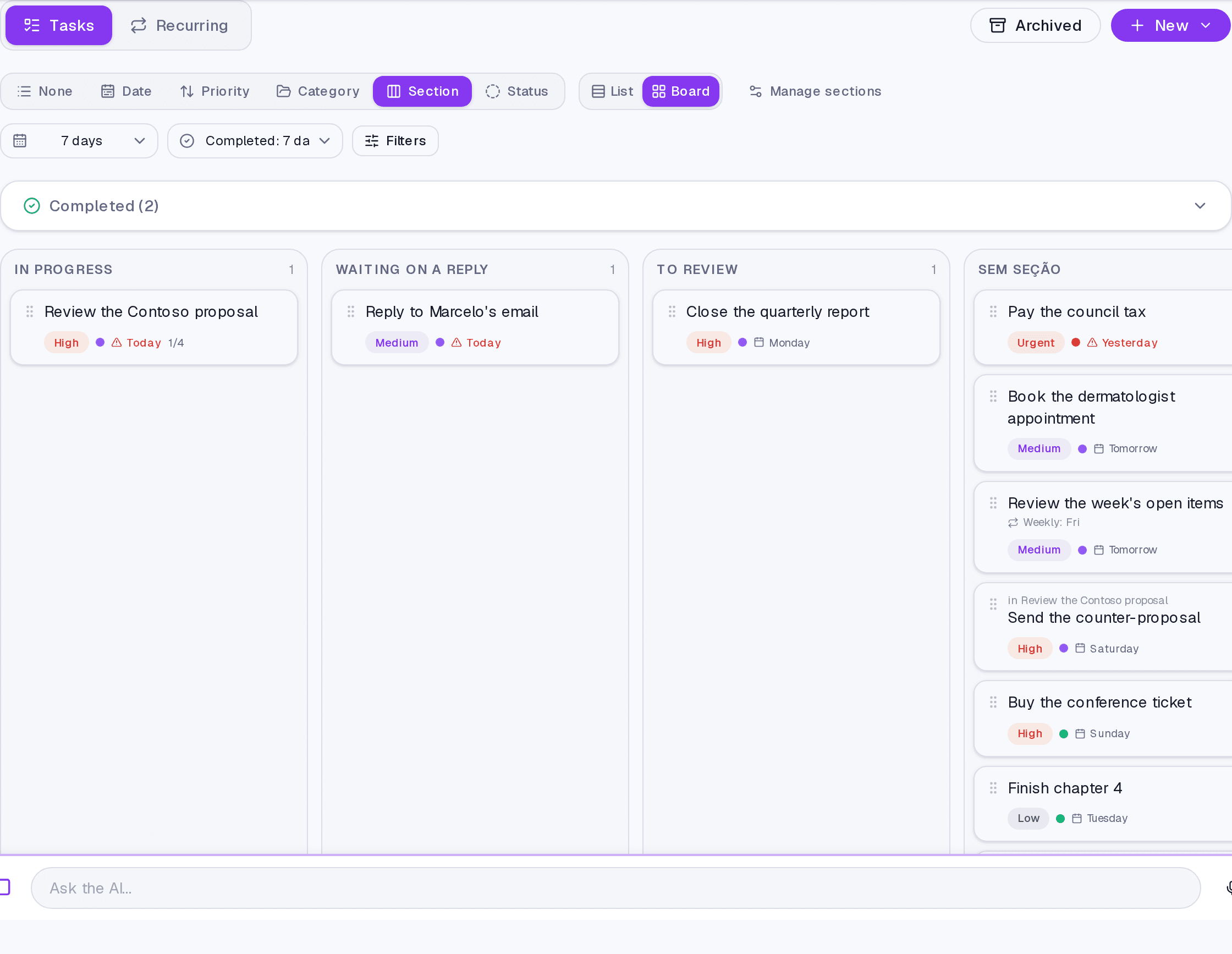
None, Date, Priority, Category, Section, or Status. In the board layout, the grouping becomes the columns.
Where it lives
The Tasks screen header. The counter beside it shows how many filters are active, and Clear filters puts everything back.
Common questions
Why do recurring tasks have their own filter? Because they generate future occurrences without end. Without a horizon, one daily recurrence would fill any long period on its own.
Are filters remembered? They hold while you are on the screen. That is what lets you switch between list and board without rebuilding everything.
Updated on August 26, 2026